Dictation with
Neural Velocity.
Press a shortcut. Speak. Text appears at your cursor — in any app, any window, on any desktop. Record meetings privately, no bots needed. Zero cloud. Zero account. Free forever.
Don't type it.
Just say it.
Press your shortcut. Speak naturally. NimbleScribe types clean text directly at your cursor — in any app.
No copy-paste. No switching windows. Text appears at your cursor, instantly, in any app on macOS.
Speed
The average person types 45 WPM. NimbleScribe lets you speak at 200+ WPM and injects the result directly into any field.
Same message. NimbleScribe finishes while the keyboard is still going.


NimbleScribe injects text directly at your cursor in any app — no copy-paste, no switching windows. It just flows.
Made for your workflow
Code faster. Document without stopping.
Dictate PR descriptions, inline comments, Slack updates, and README files without taking your hands off the keyboard. Works in VS Code, Xcode, Cursor, Warp, and any terminal.
Download FreeVisual Precision
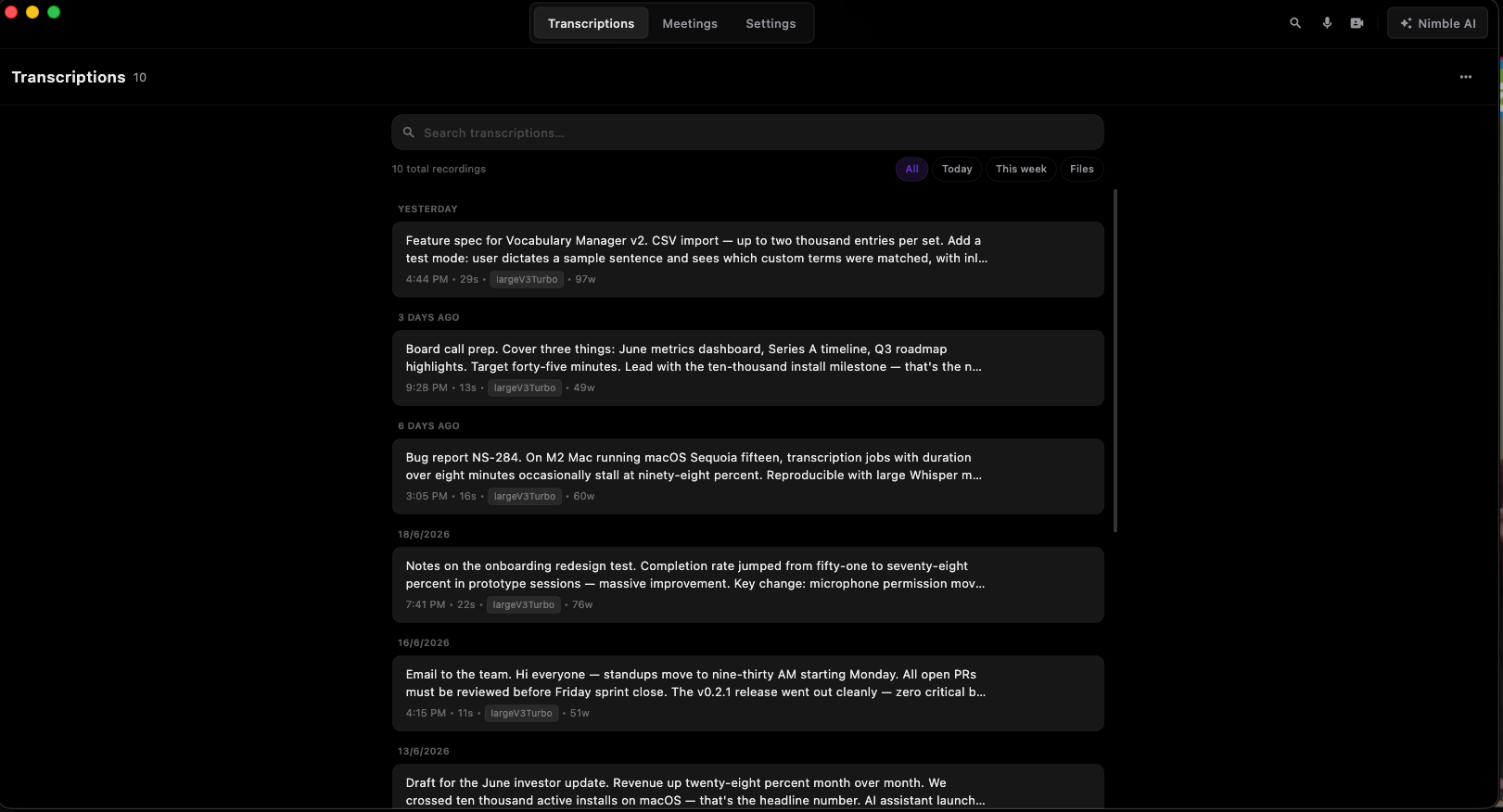
Four themes — Dark, Light, System, Glass. Switch anytime from Settings.
Privacy by design
We store nothing🚫 in the cloud.
Your audio is processed locally by a Whisper model running on your Mac. It never touches a server — because there is no server.
What we DON'T do
What actually happens
Everything you need
Builtforpeoplewhothinkfasterthantheytype.
Your voice never leaves this machine.
No account. No uploads. No analytics. Whisper runs natively on your Mac — every word is processed locally, and nothing goes anywhere except onto your screen.
Real-time on Apple Silicon.
Built around the M-series Neural Engine. Transcription finishes under 500ms with no battery penalty.
Works in every app.
Slack, Xcode, Notion, Terminal. Uses the Accessibility API to inject text directly at your cursor — no clipboard side effects.
Meeting Recorder.
Records Zoom, Teams, Meet without bots or shared links. Direct system audio — no one knows you're recording.
On-device AI.
Chat with transcriptions, generate summaries, extract action items. Local LLM — no API key, no cloud.
100+ languages.
Detects language automatically. Switch mid-sentence. No configuration required — it just works.
Complete Feature Set
Everytoolapoweruserneeds.
One app. No subscriptions. No cloud dependency. Here is everything NimbleScribe ships with today.
Voice Dictation
Press your shortcut, speak, release. Text appears at your cursor in any app — Slack, Notion, Xcode, Terminal, email, browser. Uses the macOS Accessibility API for direct injection with no clipboard side effects.
Meeting Recorder
Detects Zoom, Teams, and Google Meet automatically. Captures full system audio — your voice plus everyone else on the call. No bot. No link. No notification to other participants. Entirely silent.
Nimble AI Chat
Ask questions about any transcription or meeting in plain language. "What were the action items?", "Draft a follow-up email", "Summarise in 3 bullets." Powered by a local Qwen2.5 LLM — no API key, no billing.
Grammar AI Cleanup
A second on-device model polishes raw transcriptions automatically. Strips filler words ("um", "uh", "like"), fixes punctuation, smooths repetitions. Never changes your actual words. Completely offline.
Custom Global Shortcut
Assign any key combination as your recording trigger. The shortcut is registered system-wide — it fires even when NimbleScribe is in the background, the app window is hidden, or you are in full-screen mode.
100+ Languages
Powered by Whisper, NimbleScribe automatically detects your spoken language — no manual selection required. Switch languages mid-dictation. Strong accuracy across English, Spanish, French, German, Arabic, Chinese, Hindi, and dozens more.
Meeting Summaries & Action Items
After every recorded meeting, Nimble AI generates a structured summary with key decisions and extracted action items. Everything formatted, timestamped, and ready to paste into your project management tool.
Zero Data Policy
Your audio never leaves your Mac. NimbleScribe makes exactly two network calls ever — one to check for updates and one to download your chosen model. After that: permanently air-gapped. No telemetry, no analytics, no hidden pings.
Apple Silicon Optimised
Built exclusively for M-series chips. Transcription runs on the Neural Engine, leaving your CPU and GPU free. Latency under 500ms. Battery impact near zero. Performance scales from M1 to M4 Ultra.
Menu Bar Popover
NimbleScribe lives in your menu bar. Click the icon for an instant popover: your recent transcriptions, one-click copy, full-text search, and quick settings — without ever opening the main window.
Transcription History & Export
Every dictation is saved locally with a timestamp. Full-text search across your entire history. Select one or many transcriptions and export as plain text, or copy directly to clipboard. Auto-delete policy is configurable.
Four Visual Themes
Dark, Light, System (follows macOS), and Glass (frosted translucency). Switch at any time from the Settings toolbar. The app honours your macOS dark-mode preference automatically if you use System mode.
Meeting Mode
Recordsyourmeetingssilently.Nobots.Nolinks.
The moment NimbleScribe detects a Zoom, Teams, or Google Meet call, it offers to start recording system audio directly. No bot joins your meeting. The other participants never know.
AI Assistant
On-device · No cloud
AI Assistant
Chatwithyourtranscriptions—locally.
A small language model runs directly on your Mac. Ask questions, summarize meetings, extract action items — all without an internet connection or any billing.
Comparison
Howdoesitstackup?
Use Cases
Loved by users
People who switched
never looked back.
Engineers, doctors, lawyers, writers — anyone who types a lot, loves NimbleScribe.
“I dictate all my PR descriptions now. What used to take 10 minutes takes 90 seconds.”
Sarah Chen
Senior Engineer · Stripe
“The offline-only approach is non-negotiable for legal. Client confidentiality isn't optional.”
Marcus Webb
Partner · Webb & Associates Law
“The only app on my Mac I haven't had to justify to our IT security team. Zero cloud footprint.”
Priya Nair
Product Manager · Notion
“Sending patient notes to any cloud is a HIPAA risk. NimbleScribe solves this completely.”
Dr. Tom Okonkwo
Physician · Hopkins Medicine
“I write all my video scripts by speaking now. The accuracy is insane — and it's completely free.”
Lisa Bergström
Creator · 180k YouTube
“I dictate all my PR descriptions now. What used to take 10 minutes takes 90 seconds.”
Sarah Chen
Senior Engineer · Stripe
“The offline-only approach is non-negotiable for legal. Client confidentiality isn't optional.”
Marcus Webb
Partner · Webb & Associates Law
“The only app on my Mac I haven't had to justify to our IT security team. Zero cloud footprint.”
Priya Nair
Product Manager · Notion
“Sending patient notes to any cloud is a HIPAA risk. NimbleScribe solves this completely.”
Dr. Tom Okonkwo
Physician · Hopkins Medicine
“I write all my video scripts by speaking now. The accuracy is insane — and it's completely free.”
Lisa Bergström
Creator · 180k YouTube
“Drafting my entire dissertation by voice. No subscription, no guilt, no cloud.”
Dan Kowalski
PhD Student · MIT
“We evaluated Wispr Flow and Dragon. NimbleScribe wins on the only metric that matters for us: it never phones home.”
Aisha Rahman
CTO · Finnovate
“Transcribed a 1,500-word interview in 12 minutes. My editor thought I had a full-time assistant.”
James O'Brien
Tech Journalist
“I switch between English and Japanese mid-dictation. It auto-detects. Genuinely impressive.”
Hiroshi Tanaka
iOS Developer · Shopify
“Replaced a $30/month subscription with something free and better. The savings go to coffee now.”
Emma Fitzgerald
Startup Founder
“Drafting my entire dissertation by voice. No subscription, no guilt, no cloud.”
Dan Kowalski
PhD Student · MIT
“We evaluated Wispr Flow and Dragon. NimbleScribe wins on the only metric that matters for us: it never phones home.”
Aisha Rahman
CTO · Finnovate
“Transcribed a 1,500-word interview in 12 minutes. My editor thought I had a full-time assistant.”
James O'Brien
Tech Journalist
“I switch between English and Japanese mid-dictation. It auto-detects. Genuinely impressive.”
Hiroshi Tanaka
iOS Developer · Shopify
“Replaced a $30/month subscription with something free and better. The savings go to coffee now.”
Emma Fitzgerald
Startup Founder
Setup & Daily Workflow
Twominutestosetup.Zeroefforteverydayafter.
Download the app, pick a local model, and you're done. From that point on, NimbleScribe is just a keyboard shortcut — no cloud, no login, no friction.
One-time setup
~2 minutes · done once
Download the free app
No account, no email, no credit card. Mac (.dmg) or Windows (.exe).
Choose a local model
Pick Whisper Large-v3-turbo for best accuracy. Download it once (~1.5 GB) — it lives on your device forever.
Grant required permissions
Microphone, Accessibility, Screen Recording. One-time OS prompt (macOS or Windows).
Set your shortcut
Default is ⌃⇧ Space. Change it to anything you like in Settings → Shortcuts.
Daily dictation
every day · 3 keystrokes
Click into any text field
Slack, Notion, email, code editor, anything.
Press your shortcut & speak
Talk naturally. NimbleScribe listens locally.
Release — text appears instantly
Pasted at your cursor. No clipboard. <500ms.
Meeting transcription
one click · full notes
Join your Zoom / Teams / Meet call
NimbleScribe detects it automatically.
Click Record in the popover
Silent capture. No bot. No one notices.
After the call — full notes ready
Transcript + AI summary + action items. Local.
How it works
Simplerthanyouthink.
01
Press your shortcut.
Hold Option + Space — NimbleScribe starts listening instantly. A subtle indicator appears in your menu bar.
02
Speak naturally.
Talk at normal pace. Whisper understands context, punctuation, and natural speech patterns automatically.
03
Text appears at cursor.
Release the key. Your transcription is injected exactly where your cursor is — in any app, no clipboard.
Privacy & Security
YourdataneverleavesyourMac.Ever.
Most voice tools send your audio to the cloud, store it on their servers, and use it to train future models. NimbleScribe does none of that. The architecture is air-gapped by design — not as a privacy feature added later, but as the foundation from day one.
Audio processed entirely on your M-chip
Whisper runs as a local subprocess — no streaming, no upload
Zero network calls during transcription
Verified: no outbound traffic after model download
No account, no sign-in, no profile
There is no server to log in to
No telemetry, no analytics, no crash reports
We do not know how many people use NimbleScribe
Open source transcription core (Whisper)
You can audit exactly what the model does
Meetings recorded to local encrypted disk only
Audio files stay in your Mac's Application Support folder
Works fully in air-gapped environments
Safe for legal, medical, government, and confidential use
Lifetime network activity
Safe for regulated industries
Because no data ever leaves your device, NimbleScribe requires no GDPR data processing agreements, no HIPAA BAAs, no security review — it simply has no data to disclose.
FAQ
Commonquestions.
Is NimbleScribe really free?
Does it need internet?
Which Macs are supported?
How accurate is the transcription?
Can I use it in meetings?
Is the AI assistant truly local?
What is Grammar AI Cleanup?
Can I customise my keyboard shortcut?
What is the menu bar popover?
Does the meeting recorder work without a bot?
How much disk space do I need?
Can I use NimbleScribe in a secure / air-gapped environment?
Is there a Windows version?
Who built this
MadebyNimbleSoftwareLab.
NimbleScribe is a product of Nimble Software Lab — an enterprise software studio based in Dhaka, Bangladesh. We build products we believe are missing from the world, starting with the tools we use ourselves every day.
NimbleSL has shipped 50+ software products across 12 countries — from AI-powered enterprise ERPs to fraud detection systems. NimbleScribe is our take on what a voice productivity tool should look like: no compromises on privacy, no subscriptions, no vendor lock-in.
50+
Products shipped
12
Countries served
98%
Client retention
2024
Year founded
Dhaka, Bangladesh · Enterprise-grade software at 40–60% below US agency rates · Trusted by teams in the US, EU, and Asia.
Download NimbleScribe free. No email, no trial, no subscription — just open and speak.
Requires macOS 13 Ventura or later · Apple Silicon (M1–M4)